A uniform resource identifier (URI) is a string of characters that identifies a resource without ambiguity. That resource might be a web page, but it could just as easily be an email address, a file or even a book.
You use URIs every day, usually without realising it. Every link you click is one. So is the address in your browser bar.
Put simply, a URI is a fixed name or address. On the web, the thing it names is called a resource. The rules for URIs are set out in RFC 3986, the technical standard published by the Internet Engineering Task Force (IETF). Because everyone follows the same rules, browsers, servers and apps all over the world read a URI in exactly the same way.
A URI doesn't always have to point to a location. Sometimes it's just a name. What matters is that it identifies one resource and can't be mistaken for another.
The name itself tells you a lot about what a URI does. Each of the three words has its own job:
Uniform: everyone uses the same rules and the same structure, so very different systems can all work with the same URI.
Resource: the thing the URI refers to. That can be almost anything.
Identifier: the URI makes a resource recognisable, much like a number plate identifies a car.
In this context, the word resource is very broad. It isn't limited to web pages. According to the standard, a resource can include:
a web page, image or PDF
a service, such as an API that returns data
a physical object, such as a book with an ISBN
a person or an organisation
an abstract idea, such as a relationship between two things
You can't open the URI of a physical book in your browser. It's still a valid URI, though, because it points to that one specific book.
Without an agreed way to name things, the web simply wouldn't work. A link has to mean the same thing in every browser. An API request has to arrive at every server in the same form.
URIs make that possible. They're essential for a few reasons:
One standard: every system reads a URI according to the same rules.
Uniqueness: a URI points to exactly one resource.
Flexibility: through schemes such as https, mailto and tel, the same system works for very different kinds of resources.
Linking: because everything has its own URI, resources can refer to one another. That's the foundation of hyperlinks and linked data.
URIs matter for SEO too. Search engines treat every unique URI as a separate page. If the same content lives at several URIs, you end up with duplicate content. Stable, clear URIs help you avoid that.
URI, URL and URN are often used interchangeably, but they don't mean quite the same thing. URI is the umbrella term. URLs and URNs are two types of URI.
A URL (uniform resource locator) is a URI that tells you where a resource lives and how to retrieve it. The start of the URL names the protocol, such as https or ftp. The location follows, for example:
https://www.example.com/contact
So every URL is a URI. But not every URI is a URL.
A URN (uniform resource name) is a URI that simply gives a resource a permanent name. It says nothing about where the resource can be found. That means a URN stays valid even if the resource moves or disappears from the web. This example identifies a book by its ISBN:
urn:isbn:0451450523
The table below compares the three terms.
Feature | URI | URL | URN |
What it is | Umbrella term | URI with a location | URI with a permanent name |
Says where the resource is | Sometimes | Yes | No |
Says how to retrieve it | Sometimes | Yes | No |
Still valid if the resource moves | Depends on the type | No | Yes |
Example | mailto:info@example.com | https://www.example.com | urn:isbn:0451450523 |
In practice, the line between them has blurred. The official standard now treats URL and URN mainly as roles a URI can play. Browsers and web developers, on the other hand, almost always say URL, even when they technically mean URI.
Every URI follows the same fixed structure. Some parts are required, others are optional. The general form looks like this:
scheme:[//authority]path[?query][#fragment]
Anything in square brackets can be left out. Take this URI as an example:
https://www.example.com:8080/blog/article?id=42#comments
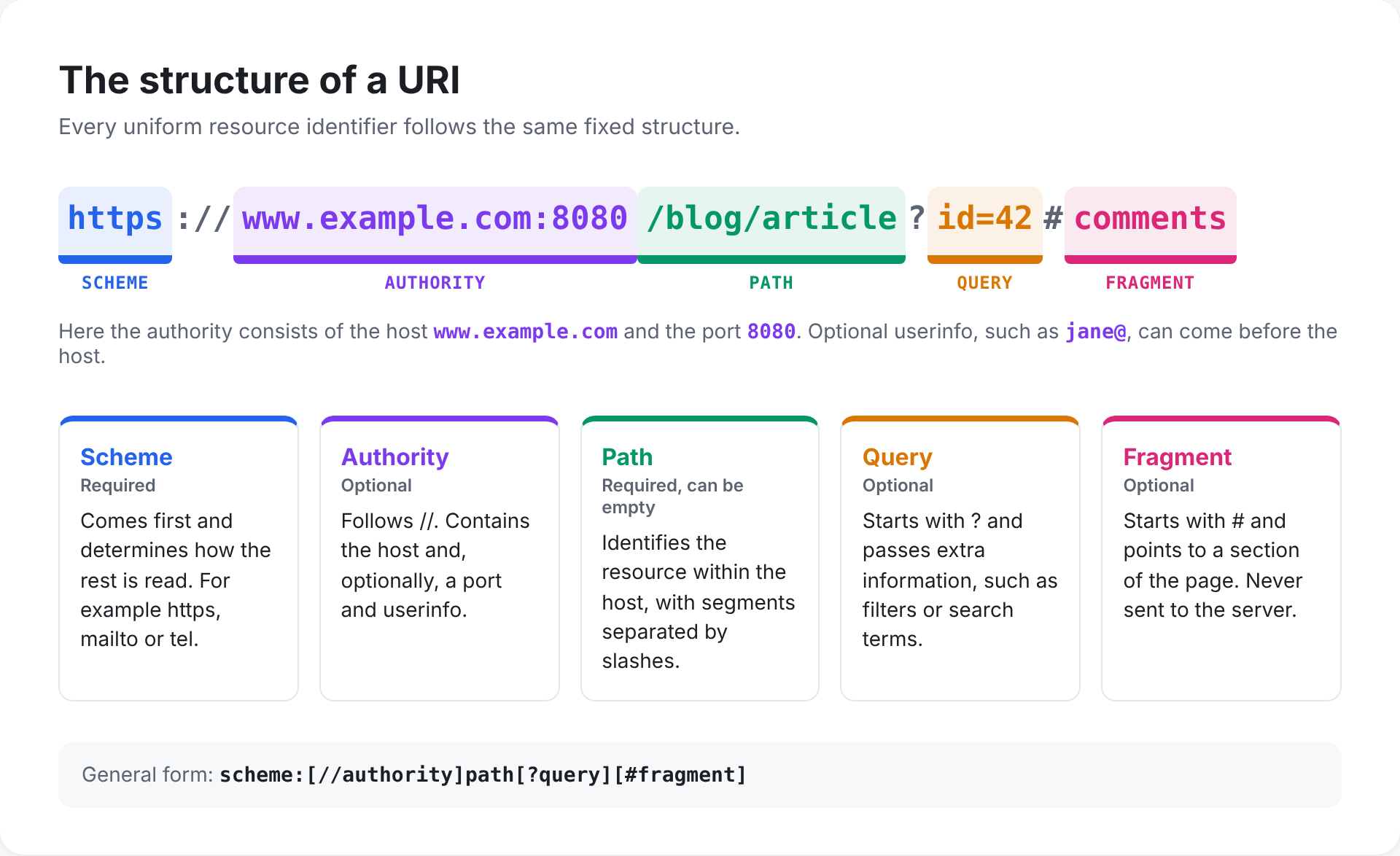 The table shows what each part does.
Component | In the example | Required? |
Scheme | https | Yes |
Authority | www.example.com:8080 | No |
Path | /blog/article | Yes, but it can be empty |
Query | id=42 | No |
Fragment | comments | No |
The scheme always comes first and ends with a colon. It determines how the rest of the URI should be read. Well-known schemes include http, https, ftp, mailto, tel and file.
IANA maintains the official register of schemes. Schemes aren't case-sensitive, but the standard recommends lower case.
The authority follows two slashes (//). Usually it's the domain name or IP address of the server. The authority can have up to three parts:
Userinfo: a username followed by @, such as jane@ in ftp://jane@ftp.example.com. This part is optional. Putting a password in a URI is strongly discouraged.
Host: the domain name or IP address, such as www.example.com.
Port: the port number after a colon, such as :8080. If you leave it out, the default port for the scheme applies: 443 for https and 80 for http.
Not every URI has an authority. In mailto:info@example.com, for instance, there are no double slashes at all.
The path identifies the resource within the host. It's made up of segments separated by slashes, such as /blog/article. It often looks like a folder structure.
It doesn't have to be one, though. The server decides what a path means. A path can also be empty, as in https://www.example.com.
The query starts with a question mark. It passes along extra information that doesn't fit in the path. Usually that's a set of name and value pairs, separated by an ampersand:
?id=42&lang=en
The = and & format is a convention rather than a strict rule of the standard. You'll often see queries in searches, filters and tracking codes such as UTM parameters.
The fragment starts with a hash (#). It points to a part of the resource, such as a heading on a page.
Your browser doesn't send the fragment to the server. It stays in the browser, which uses it to jump straight to the right part of the page, for example.
URIs come in many shapes. The scheme at the start tells you straight away what kind of resource you're dealing with. The table below shows just how varied they can be.
URI | Scheme | What it does |
https://www.example.com/contact | https | Opens a web page over a secure connection |
ftp://ftp.example.com/report.pdf | ftp | Downloads a file over FTP |
mailto:info@example.com | mailto | Opens a new email to this address |
tel:+442079460000 | tel | Starts a phone call |
file:///C:/Documents/notes.txt | file | Points to a file on your own computer |
urn:isbn:0451450523 | urn | Names a book by its ISBN |
geo:51.5074,-0.1278 | geo | Points to a location on a map |
data:text/plain;base64,SGVsbG8= | data | Contains the content itself, here the text "Hello" |
Only the first two actually fetch something from a server. The others open an app, point to something on your own device or simply give a name. Yet they all follow the same structure.
On websites you won't always see the full URI. The code often contains only part of it. That's known as a relative reference, or a URI reference in the language of the standard.
An absolute URI is complete. It starts with a scheme and contains everything needed to find the resource:
https://www.example.com/blog/article
An absolute URI works anywhere. It doesn't matter which page it appears on.
A relative URI leaves out part of the address, usually the scheme and the host. It only works together with a base URI, which is often the address of the page you're on. There are a few common forms:
/contact: starts from the root of the same host.
article-2: sits in the same folder as the current page.
../about-us: goes up one folder first.
//cdn.example.com/logo.png: borrows the scheme of the current page.
#comments: points to a section of the same page.
Relative URIs make it easier to move a website to a different domain. The links simply keep working.
Turning a relative URI into an absolute one is called resolution. The browser takes the base URI and fills in the missing parts. Say you're on https://www.example.com/blog/article. The references are then resolved like this:
Relative URI | Becomes |
/contact | https://www.example.com/contact |
article-2 | https://www.example.com/blog/article-2 |
../about-us | https://www.example.com/about-us |
#comments | https://www.example.com/blog/article#comments |
The standard spells out the rules for this step in detail. That's why every browser arrives at the same result.
A URI can't contain just any character. The standard only allows characters from ASCII: Latin letters, digits and a handful of punctuation marks. Everything else needs a workaround.
The standard splits the permitted characters into two groups:
Unreserved characters: the letters A to Z, the digits 0 to 9 and the characters - . _ ~. You can use these anywhere.
Reserved characters: characters with a special function, such as : / ? # [ ] @ ! $ & ' ( ) * + , ; =. They separate the parts of a URI from one another.
Want to use a reserved character as ordinary text? Then you need to encode it. Otherwise the system will assume it has a special meaning.
Percent-encoding replaces a character with a percent sign followed by two hexadecimal digits. Those digits represent the character's byte value. Here are a few common examples.
Character | Encoded |
space | %20 |
& | %26 |
# | %23 |
/ | %2F |
é | %C3%A9 |
So a search for "café paris" becomes ?q=caf%C3%A9%20paris in a URI. Browsers usually handle this for you. The address bar often still shows the readable version.
In forms, you'll sometimes see a space written as a plus sign. That rule comes from a separate standard for form data, not from the URI standard itself.
A standard URI only supports ASCII. For characters such as é, ü or Chinese script, there's the IRI (internationalised resource identifier), defined in RFC 3987. An IRI can contain Unicode characters.
When an IRI is sent, it's converted into an ordinary URI. The path and query are percent-encoded. Domain names with special characters go through Punycode, so bücher.de becomes xn--bcher-kva.de, for example.
URIs are part of almost everything to do with the web. These are the places where they play the biggest role.
Every link in HTML uses a URI, in the href attribute. Browsers also load images, scripts and stylesheets through URIs. A web page is really a network of URIs pointing to each other.
In a REST API, every resource has its own URI, such as /customers/42/orders. The HTTP method decides what you do with that resource: fetch it with GET, create it with POST, update it with PUT and remove it with DELETE. A logical URI structure makes an API far easier to understand.
In XML, a URI serves as the name of a namespace. That stops two elements with the same name from getting mixed up. SVG, for example, uses http://www.w3.org/2000/svg. That URI doesn't need to lead to a real page. It's only there as a unique name.
In linked data, everything gets a URI: people, places, concepts and the relationships between them. This is often done in the RDF format. It allows separate databases to refer to the same things. Wikidata is a well-known example.
Apps often use their own scheme to jump straight to a particular screen, such as spotify: or whatsapp:. These are called deep links. They follow the same URI structure as everything else.
The idea behind the URI came from Tim Berners-Lee, the inventor of the World Wide Web. He wanted a single way to name everything on the web. In his first proposal, the U stood for universal. During the standards work at the IETF, that became uniform.
From there, the standard grew in a few steps into what we use today.
Year | Milestone |
1994 | RFC 1630 first describes the URI, still called a universal resource identifier |
1994 | RFC 1738 defines the URL |
1997 | RFC 2141 defines the syntax of the URN |
1998 | RFC 2396 brings URLs and URNs together under one generic URI syntax |
2005 | RFC 3986 becomes the current URI standard |
2005 | RFC 3987 adds the IRI for international characters |
Around 2012 | The WHATWG URL Standard describes how browsers handle URLs in practice |
RFC 3986 made URI the official umbrella term. Browsers, however, also follow the WHATWG URL Standard, which uses the word URL throughout because that's the term most people know.
A uniform resource identifier is the standard way to name a resource. Every URI follows the same structure: scheme, authority, path, query and fragment. A URL tells you where something is. A URN simply gives it a name. Both fall under the URI.
If you work with websites, APIs or data, you deal with URIs every day. Once you understand how they fit together, you'll build better links and spot problems faster. A missing bit of percent-encoding or a broken relative link then becomes a quick fix.
Yes. A URL is a type of URI that also tells you where a resource is and how to retrieve it. The reverse isn't always true. A URN is a URI, but it isn't a URL.
Partly. Case doesn't matter in the scheme or the host. In the path, query and fragment it can. Whether /Contact and /contact show the same page is up to the server.
An IP address is the number of a device on a network. A URI identifies a resource and can include an IP address as its host, such as http://192.0.2.10/page. Usually it contains a domain name instead, which DNS translates into an IP address.
The standard doesn't set a maximum length. Browsers, servers and search engines do have their own limits, though. Stay well under 2,000 characters and you'll be safe almost everywhere.
No. A URI only needs to name a resource. A URN or the URI of an XML namespace often leads nowhere at all. In that case it's purely a unique name.
That's percent-encoding. A URI can only contain a limited set of characters. Others, such as a space or an é, are converted into a percent sign followed by a code. %20, for example, stands for a space.